
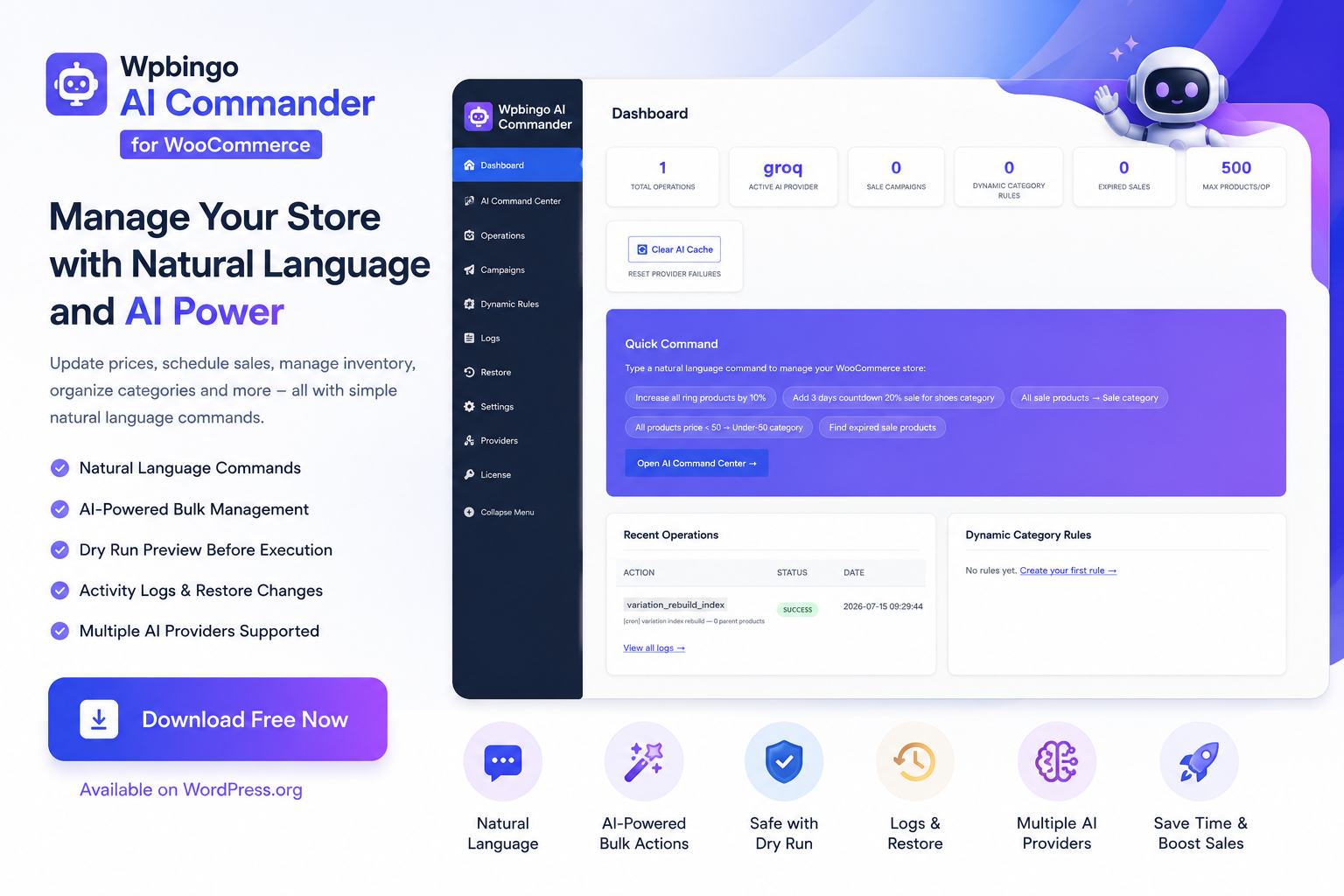
Wpbingo AI Commander for WooCommerce
Manage your entire WooCommerce store with natural-language commands — no spreadsheets, no manual clicks.
Running a WooCommerce store means constantly updating prices, adjusting stock, scheduling sales, and managing hundreds — or thousands — of products. What if you could do all of that by simply typing a sentence? That’s exactly what Wpbingo AI Commander for WooCommerce delivers.
Available for free on WordPress.org, AI Commander for WooCommerce lets store owners control WooCommerce products using plain English (or German, French, Spanish, and more) commands powered by cutting-edge AI. Whether you need to “increase all jacket prices by 15%”, “put all shoes on a 3-day flash sale”, or “move all out-of-stock items to draft” — one command handles it all.
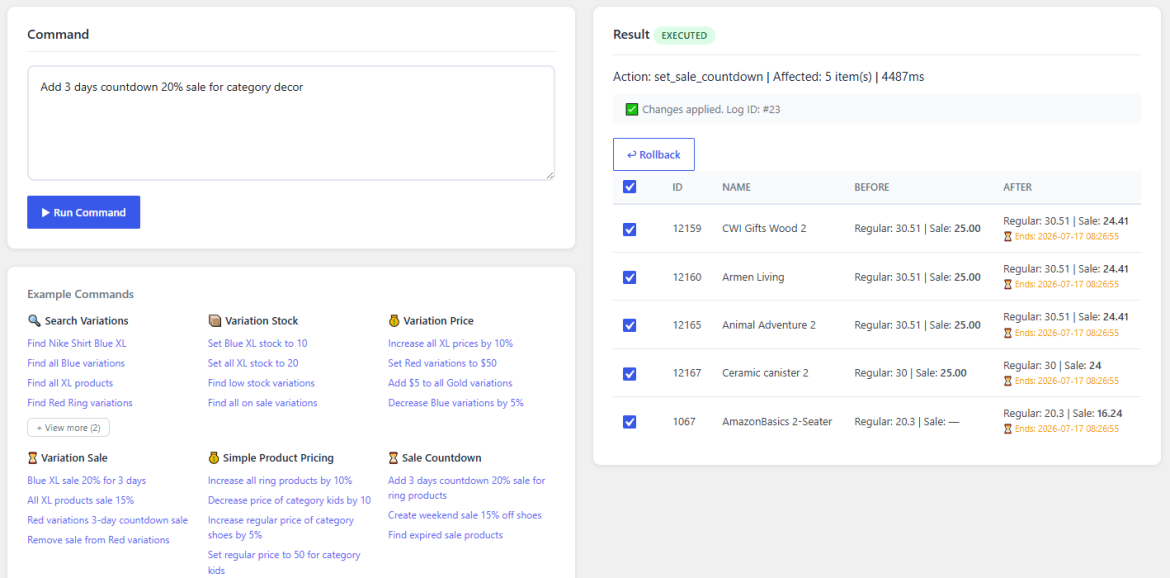
Table of Contents
Why Is This Different from Other Bulk Edit Plugins?
Most WooCommerce bulk edit tools require you to navigate spreadsheet grids, fill form fields, and click through multiple screens. AI Commander for WooCommerce takes a radically different approach: you just type what you want, in your own words.
Traditional plugins make you think like a database. AI Commander lets you think like a store owner.
Key Features at a Glance
Natural-Language Commands
Type commands in English, French, German, Spanish, Hindi, and more. No syntax to learn.
Bulk Pricing Engine
Increase, decrease, or set regular/sale prices by percentage, fixed amount, or absolute value — across any product set.
Stock Management
Set quantities, mark products in or out of stock, and update stock status in bulk — instantly.
Sale Campaigns
Schedule time-limited sales with automatic start/end dates. Action Scheduler handles batch processing in the background.
Variation Engine
Target specific variation attributes (size, color, material) with fast FULLTEXT index lookups.
Dynamic Categories
Keyword-based auto-assignment rules that sync automatically via WP-Cron. Set it once, forget it.
Dry Run Mode
Preview every change before applying it. Cherry-pick individual products with Apply Selected.
One-Click Rollback
Every command stores a full rollback snapshot. Made a mistake? Undo it instantly from the Logs panel.
Multi-Provider AI
OpenAI, Claude, Gemini, Groq, OpenRouter — with automatic failover chain and retry logic.
Supported AI Providers
You bring your own API key and choose your preferred AI brain. The plugin supports five providers with automatic fallback, so your store keeps running even if one provider is temporarily unavailable:
🟣 Anthropic Claude (Haiku 4.5)
🔵 Google Gemini (2.5 Flash)
🟠 Groq — Free Tier
⚪ OpenRouter — Free Tier
💡 Want to start for free? Groq and OpenRouter both offer free API tiers — you can start using AI Commander at zero cost today.
How It Works: 3 Simple Steps
Install & Enter Your API Key
Install the plugin from WordPress.org, activate it, and go to AI WooCommerce → Settings to add at least one AI provider key. Keys are stored with AES-256-CBC encryption.
Type Your Command
Navigate to AI WooCommerce → Dashboard and type what you need: Increase all hoodie prices by 20%, Set all small t-shirts out of stock, Run a 3-day sale on all shoes at 30% off starting tomorrow.
Preview, Apply & Rollback if Needed
Use Dry Run to review all changes before they go live. Apply all or cherry-pick specific products. If you change your mind, hit Rollback in the Logs panel — every operation is reversible.
See AI Commander for WooCommerce in Action
Watch the step-by-step tutorial to see how AI Commander for WooCommerce handles bulk pricing, flash sales, and rollback in real time.
How Does It Compare to Other WooCommerce Bulk Edit Plugins?
Here’s an honest side-by-side comparison of AI Commander against the most popular alternatives:
| Feature | 🏆 AI Commander (Wpbingo — Free) |
Smart Manager Free/Paid |
AI Product Tools Paid |
WP Sheet Editor Paid |
Setary $12+/mo |
|---|---|---|---|---|---|
| Natural-language AI commands | ✔ Yes | ✘ No | ~ Content only | ✘ No | ✘ No |
| Bulk price update | ✔ Yes | ✔ Pro | ✘ No | ✔ Yes | ✔ Yes |
| Bulk stock management | ✔ Yes | ✔ Pro | ✘ No | ✔ Pro | ✔ Yes |
| Sale campaigns (scheduled) | ✔ Yes | ~ Limited | ✘ No | ~ Manual dates | ✘ No |
| Variation attribute targeting | ✔ Yes | ~ Grid only | ✘ No | ✔ Yes | ✔ Yes |
| Dynamic category rules | ✔ Yes | ✘ No | ✘ No | ✘ No | ✘ No |
| Dry Run preview | ✔ Yes | ✘ No | ✘ No | ✘ No | ~ Basic |
| One-click rollback | ✔ Yes | ✘ No | ✘ No | ✘ No | ✘ No |
| Multiple AI providers | ✔ 5 providers | ✘ No | ✔ 4 providers | ✘ No | ~ Limited |
| Free tier AI option | ✔ Groq / OpenRouter | ✘ No | ✘ No | ✘ No | ✘ No |
| HPOS compatible | ✔ Yes | ✔ Yes | ✔ Yes | ✔ Yes | ✔ Yes |
| AES-256 encrypted API keys | ✔ Yes | ✘ No | ✘ No | ✘ No | ✘ No |
| Customer data sent to AI | ✔ Never | N/A | ~ Product data | N/A | N/A |
| Plugin price | ✔ Free | Free + Paid | Paid | Paid | $12+/month |
✔ Supported | ✘ Not available | ~ Partial support. Comparison based on publicly available feature documentation as of July 2026.
🔒 Security & Privacy — Built the Right Way
- AES-256-CBC encryption for all stored API keys
- Nonce-secured AJAX on every endpoint
- Per-user rate limiting to prevent abuse
- No product names, prices, or SKUs are sent to AI providers — only your typed command and category names
- Zero customer or order data is ever transmitted to external services
- Full data cleanup on uninstall — all 4 custom DB tables, settings, and encrypted keys are removed
Real-World Use Cases
📣 Running a Flash Sale
Type: Apply 25% sale on all products in the "Summer" category starting this Friday for 48 hours. AI Commander for WooCommerce schedules the campaign, auto-starts and auto-ends the sale, then rolls back prices — no manual intervention needed.
📈 Reacting to Supplier Price Changes
Type: Increase all products tagged "imported" by $5. Every matching product updates immediately. Didn’t like the result? One click in the Logs panel undoes everything.
🏗️ Managing Variable Products
Type: Mark all size XS variations of hoodies out of stock. The Variation Engine queries the dedicated FULLTEXT index and updates only the exact variations you need — not the entire product.
🗂️ Auto-Assigning Categories
Set up a dynamic rule: “Products containing the keyword ‘organic’ → assign to category ‘Organic'”. WP-Cron syncs this automatically as you add new products — your categories stay organized without any manual work.
Installation in 5 Minutes
- Go to Plugins → Add New Plugin in your WordPress admin and search for Wpbingo AI Commander, or download directly from WordPress.org.
- Click Install Now, then Activate.
- Go to AI WooCommerce → Settings and enter your preferred AI provider API key. (First time? Grab a free key from Groq.)
- Head to AI WooCommerce → Dashboard and type your first command. Use Dry Run to preview results safely.
Full setup guide with screenshots is available in the official documentation.
Frequently Asked Questions
Do I need a paid AI subscription to use AI Commander for WooCommerce?
No. Groq and OpenRouter both offer free API tiers. You can start at zero cost and upgrade only when you need more API capacity.
Is AI Commander for WooCommerce safe to use on a live store?
Yes. Always use Dry Run mode first to preview changes. If anything looks wrong, simply don’t apply. Every executed command also has a rollback snapshot, so you can undo changes at any time.
Will it affect my store’s front-end performance?
No. All operations run in the WordPress admin only. Large batch operations (1,000+ variations) are processed as background jobs via Action Scheduler and won’t block your store.
What happens to my data if I uninstall?
Everything is cleaned up automatically — all 4 custom database tables, settings, encrypted API keys, scheduled jobs, and transients are removed. Your WooCommerce products are unaffected.
Which languages can I use for commands?
English, German, French, Spanish, Italian, Portuguese, and Hindi are officially supported. Many other languages work too, as the AI is inherently multilingual.
Ready to Save Hours Every Week?
Join WooCommerce store owners who are already managing their products with AI Commander for WooCommerce. Free to install, free to use — right now on WordPress.org.